
Four mistakes to avoid when adding video previews to your content discovery strategy

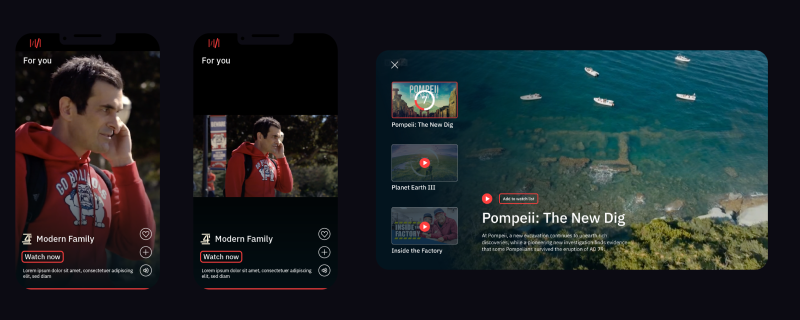
Video previews by Media Distillery
Video previews reduce decision fatigue, increase engagement, and ultimately drive higher user retention, because they help viewers quickly know whether a show is something they want to watch. With viewers short on time and attention - and content libraries larger than ever - it’s no wonder so many streaming services are adding previews to their content discovery experience.
But the journey toward finding the perfect formula for your previews is rarely a straight line. It is a process defined by trial, error, and a relentless commitment to understanding the user’s pulse.
Auto-generated video previews are a core part of Media Distillery’s Search & Discovery Suite, often used by our streaming customers to supplement the previews created by their editors. Through our work with customers like Sunrise and YalloTV we’ve seen how effective previews can be in helping users make faster, more confident viewing decisions.
But we’ve also seen how easy it can be to get them wrong. We’ve already auto-generated over 40,000 preview clips for our customers and we’ve learned that overlooking the subtleties of preview creation can mean they never unlock their full value. Avoiding spoilers is a given, but here are four of the less obvious - but crucial - pitfalls to avoid:
1. Using one length for all preview clips
One of the most common mistakes is treating time as a constant. For automation, many platforms default to a standard length (15, 30 seconds) for every preview.
The ideal preview is long enough to engage, but short enough to respect the user’s time. A complex political thriller might require 18 seconds to establish narrative tension, whereas a high-energy action sequence or a punchy sitcom gag might land perfectly in 12 seconds. By contrast, in the process of working with the editorial teams of several customers to train our solution, we found that for documentaries you want a slightly longer preview - because the slower pace of these programs means you need longer to set the scene for the content. But even then, previews differ significantly from classic, editorially produced trailers or promos, which tend to be much longer, sometimes 90 seconds or even 2 minutes in duration.
In addition, if your previews are to be optimised for a TV screen experience, they will benefit from longer versions, while for mobile viewing, shorter durations create higher engagement.
Forcing content into a rigid duration sacrifices impact; you risk either losing momentum with unnecessary padding, or killing your hook before it can land. Flexibility is the key to success.
2. Treating all genres as the same
With previews, a cookie-cutter approach is the enemy of engagement. Different genres satisfy different emotional needs, and your previews must reflect that:
Drama
For dramas and story-driven content, previews succeed when they emphasize:
- Emotional intensity
- Main character dynamics
- Narrative tension (cliff-hangers)
What to Highlight: Moments with the main characters that hint at conflict without revealing key plot points.
What to Avoid: Overly explanatory clips that remove intrigue.
Comedy
Successful comedy previews rely heavily on timing and dynamism. They should encompass:
- Quick & iconic punchlines
- Physical humor
- Relatable, contextual jokes
What to Highlight: Self-contained jokes and interactions that reveal the type of humor and dynamics of the show.
What to Avoid: Idle moments of low comedic tone. Incomplete or out-of-context jokes.
Action
Action previews excel when they focus on momentum and intensity. We see the best results with clips that include:
- Main characters interactions
- High-stakes sequences
- Visuals over dialogue
What to Highlight: Fast-paced, visual spectacle that reflects the intensity of the program.
What to Avoid: Chaos without context that can lead to confusion.
Previews must reflect, authentically, the actual viewing experience. Misleading clips might drive clicks but ultimately hurt retention, as viewers may end up disappointed.
If you apply the same editing logic to a stand-up special that you do to a gritty documentary, you’ll lose the force of pull a preview can add to the viewing experience. Users don’t engage with titles, they engage with moments; and these moments must be representative. If the moment doesn't match the genre's promise, the user moves on.
3. Not using knowledge about your user base
Most streaming platforms already personalize what content is shown. Far fewer personalize how that content is presented.
A single title can be represented in multiple ways, depending on what the viewer is looking for. One user may respond to emotional character moments, while another is drawn to action or pace. Serving the same preview to both means missing the opportunity to engage either fully.
The difference often comes down to a single moment. Selecting that moment well requires combining content understanding with user data. The preview should reflect not only what the title is, but why it is relevant to that specific viewer.
This doesn’t require one-to-one personalization, which is unrealistic to achieve at scale. Instead, user data can be used to define clear audience segments, for example, action-driven viewers, character-led drama fans, and comedy seekers. Then you can create a few different previews for key content items and match each user to a version that aligns with their viewing intent.
When done well, this combination of content and previews becomes a dynamic layer of the discovery experience, directly influencing engagement and viewing decisions.
4. Trying to create all previews by hand, with the result that only hero content gets video promotion
In an era of exploding content libraries, relying solely on human editors to manually create an endless amount of previews is a bottleneck that can hinder growth.
Relying fully on time-consuming manual clip production creates a "curation gap": the top 5% of your library gets the attention it deserves, leaving a long tail of content promoted only with static thumbnails. To elevate your content discovery experience for all your content, you can leverage AI.
State-of-the-art AI (algorithms) can automatically identify content segments, but you may not always get the results you want, nor should you leave everything to AI. It’s essential to know when to use the right technology and tools for scale, but also when to turn to your editorial and curation teams and their expertise. This is harder than it sounds, but is one of the key factors in how we successfully implement AI for streaming use cases that my colleague, Martin Prins, has previously blogged about.
Make every moment count
In a landscape where attention is scarce, previews are among the most powerful tools streaming platforms have.
By avoiding the four pitfalls I’ve outlined, platforms can make the difference between a watched title and an ignored one - a difference that often comes down to a single moment, seen or unseen.
Understanding how to surface those moments effectively has proven to win attention, time, and ultimately, loyalty.
Curious how this works in practice?
See how platforms like Sunrise are using video previews to improve content discovery and engagement, and explore other options for improving Search & Discovery.
Or speak with our team about how to scale high-performing video previews across your catalogue.